There are no items in your cart
Add More
Add More
| Item Details | Price | ||
|---|---|---|---|
Tue Oct 20, 2026
Imagine two candidates applying for similar jobs. Both have relevant qualifications, both are developing their professional skills, and both are looking for opportunities.
One candidate has a LinkedIn profile with a clear headline, a useful professional summary, relevant skills, and examples of their work. The other has an incomplete profile with very little information.
A recruiter who visits these profiles may find it easier to understand the first candidate's professional direction and suitability for a particular role.
This does not mean that a polished LinkedIn profile guarantees a job. Hiring decisions depend on many factors, including qualifications, experience, job requirements, and competition. However, a well-organized profile can help communicate your professional background more effectively.
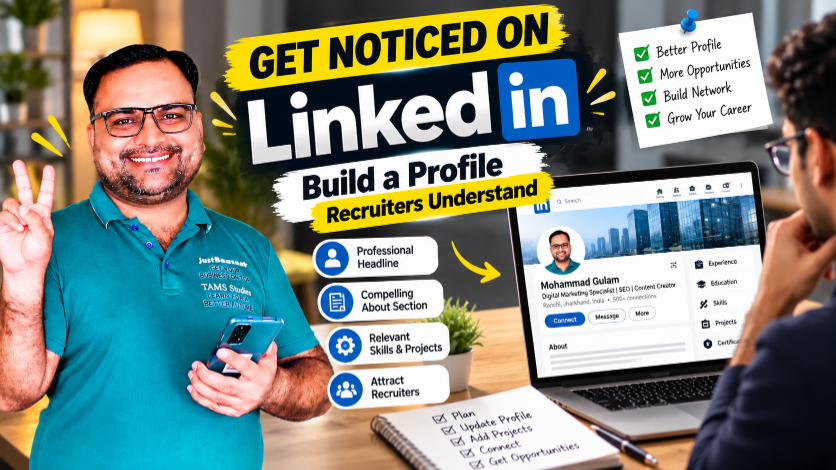
In this guide, I will explain how to create and improve your LinkedIn profile, write a professional headline, prepare an effective About section, showcase projects, build your network, and use LinkedIn as part of your career-development strategy.
LinkedIn is a professional networking platform where people can present their experience, connect with professionals, follow organizations, share knowledge, and explore job opportunities.
For job seekers, a useful profile can serve several purposes.
Remember that LinkedIn is one part of your job search, not a replacement for a strong resume, relevant skills, applications, and interview preparation.
Your profile photo is one of the first visual elements people may notice.
You do not necessarily need an expensive professional photoshoot. A clear, recent photograph with good lighting and a simple background can be sufficient.
Keep these points in mind:
Avoid using group photographs, heavily edited images, unrelated graphics, or pictures where your face is difficult to recognize.
Your photo does not need to communicate a particular personality. It should simply look appropriate for a professional networking environment.
Your headline appears near your name and helps people understand your professional identity.
Many job seekers leave the default headline or write only “Student” or “Job Seeker.” These descriptions may be accurate, but they often provide limited information about the person's skills or career direction.
A more useful headline can combine your current status, relevant skills, and target area.
Digital Marketing Fresher | SEO | Content Marketing | Social Media Management | Open to Entry-Level Opportunities
MBA Candidate | Business Analysis | Marketing Fundamentals | Research and Communication
Finance Graduate | Excel | Financial Reporting Fundamentals | Business Analysis
Digital Marketing Professional | SEO Strategy | Content Planning | Performance Analysis
These are templates, not claims to copy automatically. Include only skills you genuinely possess, and describe your experience level accurately.
A useful headline is specific without becoming a long list of unrelated keywords.
The About section is an opportunity to explain your professional background in your own words.
Instead of repeating your headline, use this section to provide context.
A useful About section generally includes:
I am a recent graduate interested in building my career in [Target Field]. I am developing my skills in [Skill One], [Skill Two], and [Skill Three], with a focus on understanding how these skills are applied in practical work.
Through my education and [relevant project, internship, or learning activity], I have been working to strengthen my understanding of the field and improve my ability to solve problems, communicate clearly, and approach tasks in an organized way.
I am interested in connecting with professionals, learning from practical experiences, and exploring suitable entry-level opportunities in [Target Field].
Replace the placeholders with accurate information. If you have a project you can demonstrate, briefly explain what you did and include a link if appropriate.
Avoid unsupported statements such as “I am the number-one expert in my industry” unless you have a meaningful, verifiable basis for that claim.
Your Experience section should help readers understand what you have done and what responsibilities you have handled.
If you have formal work experience, include the relevant job title, organization, dates, and a concise description of your responsibilities and contributions.
Use bullet points where helpful.
Example structure
Role: Digital Marketing Intern
Organization: Organization Name
Responsibilities:
This is an illustrative format. Only include responsibilities you actually performed.
If you are a fresher without formal employment, do not invent a job title or employer. Use other relevant sections to demonstrate your work.
One of the biggest concerns among freshers is that they do not have enough professional experience to create an interesting profile.
However, relevant projects can help demonstrate practical learning.
You might showcase:
For each project, explain its objective, your contribution, the tools you used, and what you learned.
Project: On-Page SEO Review of a Practice Website
Use this example only if you completed similar work. If you are planning to create a project, complete it first and describe the actual work.
A project does not need to generate revenue or achieve dramatic results to demonstrate learning. Explain the work honestly and avoid inventing performance figures.
LinkedIn allows you to list skills that help describe your professional capabilities.
Choose skills that relate to your target role and that you can explain if someone asks about them.
Do not add every skill you have heard about. Prioritize your strongest and most relevant capabilities.
If your experience is basic, be prepared to explain your current level honestly rather than presenting yourself as an advanced specialist.
Recommendations can provide additional context about your work and professional relationships.
You may request a recommendation from someone who has genuinely worked with you or supervised your work, such as:
Ask politely and make it easy for the person to understand what you would appreciate them discussing.
Sample message
Hello [Name], I hope you are doing well. I enjoyed working with you on [project or activity]. If you feel comfortable, would you be willing to write a short LinkedIn recommendation describing our work together and the skills you observed? I completely understand if your schedule does not allow it. Thank you for considering my request.
Never ask someone to write a recommendation containing claims they cannot honestly support. A genuine recommendation is more valuable than an exaggerated one.
A clean public profile URL can be easier to share on your resume, portfolio, email signature, or professional documents.
Where the option is available, you can customize your LinkedIn public profile URL through your profile settings.
Choose a simple variation of your name or professional identity if it is available.
Before sharing the link, open it in a browser to confirm that it works and leads to the correct profile.
The Featured section can help bring selected work to the attention of people visiting your profile.
Depending on the options available to your account, you may be able to showcase relevant posts, articles, links, or media.
Consider featuring:
Choose items that support the professional identity you want to communicate.
Review the links periodically to make sure they remain accessible and appropriate.
Creating a profile is only one part of using LinkedIn. You can also use the platform to build professional relationships.
Start by connecting with people who have a genuine professional connection to your interests.
For example:
When sending a connection request, a short personal note can explain why you would like to connect.
Sample connection message
Hello [Name], I am developing my career in [Field] and came across your profile while learning about the industry. I would be glad to connect and learn from the professional insights you share.
Avoid sending the same sales pitch or job request to large numbers of people. Build connections thoughtfully and respect other people's time.
You do not need to post every day to maintain a professional presence. The more important question is whether your contributions are useful, relevant, and authentic.
You can share content such as:
For example, after completing a practice project, you might explain the problem you explored, the steps you took, and what you would improve next time.
Give credit to other people's work when appropriate. Do not copy posts, invent achievements, or present another person's work as your own.
Consistency can help you practise communicating your knowledge, but posting frequency alone does not guarantee recruiter attention.
Recruiters may search for candidates using job titles, skills, industries, and other relevant terms.
Including accurate terminology in your headline, About section, Experience section, and Skills section can make your profile clearer and may help it match relevant searches.
Start with the job descriptions you are interested in. Identify the skills and role titles that appear repeatedly and determine which ones accurately describe your background.
For example, if you are pursuing an SEO role, relevant terms may include search engine optimization, keyword research, on-page SEO, and content optimization, provided you have knowledge of those areas.
Use terms naturally in sentences. Avoid stuffing your profile with repeated keywords that make it difficult to read.
No particular keyword or profile format guarantees that a recruiter will find you.
Your LinkedIn profile and resume should tell a consistent professional story.
Check that your:
Your LinkedIn profile can contain additional context and selected work samples, while your resume should be tailored to the specific vacancy.
Neither document should contain invented qualifications, misleading job titles, or unsupported results.
For more career preparation, connect this guide with the Career Building School series on resume writing and interview preparation. Insert the verified published URLs for those articles before publishing this blog.
LinkedIn can help you learn about companies, job titles, professional expectations, and skills commonly mentioned in vacancies.
When exploring a job opportunity, review:
Compare the requirements with your current skills. If you identify a gap, decide whether it is something you can develop through study, practice, or a relevant project.
Use the employer's official careers page where appropriate, especially if you need to confirm the vacancy or complete an application.
Be cautious with suspicious messages, requests for payment to secure a job, or requests for sensitive personal information through unverified channels.
Your LinkedIn profile should evolve as your career develops.
Review it whenever you:
Remove outdated claims and update information that no longer reflects your current position.
You do not need to make every update public. Review your account settings and choose the visibility options that fit your preferences.
Choose the roles or industries you are interested in. Review relevant job descriptions and identify the skills employers commonly request.
Use an appropriate profile photo and write a headline that explains your current status, relevant skills, and career direction.
Prepare a concise summary of your background, interests, practical skills, and professional goals.
Check your dates, qualifications, job descriptions, and other information for accuracy.
Prioritize relevant skills and showcase selected projects or work samples where possible.
Connect thoughtfully with alumni, professionals, and people in your target field.
Check the complete profile from the perspective of a recruiter. Confirm that it is easy to understand, accurate, and consistent with your career goals.
Make it easy for people to understand your background, recognize your relevant skills, and explore examples of your work.
Make your professional direction and relevant skills easy to understand.
Complete the sections that help explain your background. You do not need to fill every available field if it is not relevant to you.
Prioritize accurate skills and be prepared to explain your level of experience.
Build a relevant network through thoughtful, respectful communication.
You can communicate that you are looking for opportunities, but also demonstrate your interests, projects, and learning.
Use examples for inspiration, but write a profile that reflects your own qualifications and professional goals.
A profile is one element of your career strategy. Continue learning, applying for relevant positions, and preparing for interviews.
A LinkedIn profile is more than a digital resume. It is an opportunity to communicate your professional identity, showcase relevant work, and build relationships with people in your field.
You do not need years of experience or an impressive list of achievements to begin. You need accurate information, a clear professional direction, relevant skills, and a willingness to keep developing.
Start with the basics: improve your headline, write a useful About section, add relevant skills, and showcase genuine projects. Then build your network thoughtfully and update your profile as you gain experience.
Make your profile clear, make your work visible, and let your professional relationships grow through genuine engagement.
Explore Career Building School's learning resources to develop digital and professional skills, create practical work samples, and strengthen your career preparation.
Explore Career Building SchoolUse a clear professional headline, a relevant About section, accurate experience and education details, relevant skills, and examples of your work. Build a professional network and keep the information up to date.
A fresher can include their educational or professional status, relevant skills, and target field. Use accurate terms that describe your actual knowledge and interests.
Discuss your educational background, career interests, relevant skills, projects, and professional goals. You can also explain what kinds of opportunities you are exploring.
LinkedIn can support job discovery, professional networking, and profile visibility. It cannot guarantee employment, so combine it with relevant applications, skill development, and interview preparation.
Choose a posting frequency you can maintain without sacrificing quality. Useful, relevant contributions are generally more valuable than posting frequently without a clear purpose.
Add skills relevant to your target role that you can explain or demonstrate. Prioritize the most important skills rather than listing every subject you have encountered.
You can connect with recruiters who work in your target field or recruit for relevant roles. Keep your messages professional, concise, and respectful of their time.
Your education, dates, job titles, skills, and experience should be consistent and accurate. Your LinkedIn profile may provide additional context, while your resume should be tailored to each vacancy.
Yes. You can maintain a professional profile, connect with people, research companies, follow industry updates, and explore job opportunities without posting regularly.
You can improve the basic sections in a few focused sessions. Building a relevant network, developing projects, and updating your professional experience are ongoing activities.
Start with a clear profile today, keep building your skills, and make your professional progress easier to understand.
 Launch your Graphy